

After repeated in-person attempts fail to reach a defendant, the next step isn’t always obvious. A digital process server platform may offer a different workflow, but platforms vary in how they send documents, prompt recipients, and record activity. To choose one, look beyond convenience: check what the service documents and whether electronic service is permitted for the case.
It’s reasonable to want a clear record of delivery attempts, especially when a recipient is difficult to reach or notifications need to be repeated. Tracking, timestamps, and recipient activity can document events on a platform, but they don’t establish on their own that service was legally valid.
This guide compares platform models, delivery workflows, documentation, and safeguards to help you find an option that fits your operational needs. It also covers what to check about jurisdiction, case type, consent, and court authorization before using electronic service. YouGotServe is one technology-driven option, with recurring email and SMS notifications and records of recipient activity when traditional service encounters difficulty and electronic delivery is permitted or authorized.
Key Takeaways
- Match a digital process server platform to the task. Software-assisted document delivery and physical service are different workflows.
- Compare platforms by delivery method, security controls, tracking, reporting, and integrations. Verify specific capabilities rather than relying on product labels.
- Distinguish a notification attempt from document access or acknowledgment. Each activity record shows something different.
- Check jurisdiction- and case-specific rules, including consent or court authorization requirements, before choosing electronic delivery.
- You Got Serve offers recurring daily email and SMS notifications through 60-day and 90-day campaigns when electronic delivery is permitted or authorized.
What a Digital Process Server Platform Does and Where It Fits
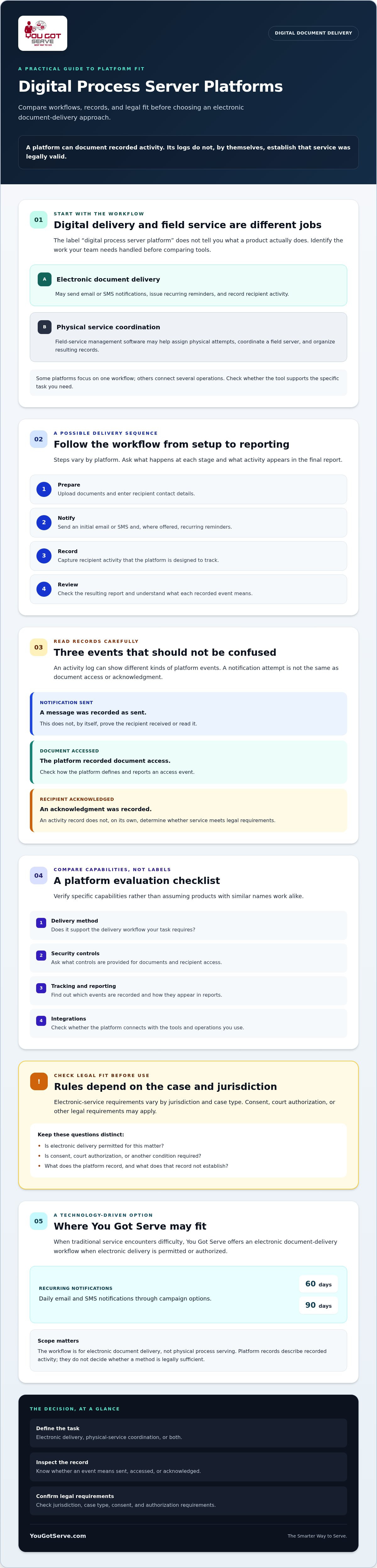
A digital process server platform uses technology to support electronic document delivery, process-service operations, or both. The label alone doesn’t tell you which workflow it provides. Some tools manage digital notifications and recipient activity; others help coordinate physical service by assigning work to a field server. These approaches address different operational needs, so start by identifying the work your team wants the platform to handle.
Service of process is the formal delivery of legal documents that gives a party notice of a legal proceeding. A service of process overview can help clarify the concept, but a platform’s activity records have a narrower role: they may document delivery attempts, access, or other recorded events. They don’t establish on their own that a recipient received legally sufficient notice or that the method complies with applicable rules. Requirements vary by jurisdiction and case type, and court authorization or other conditions may apply.
For context, this video shows a process server’s field-based work:
Digital delivery platform or field-service management software?
A digital delivery platform may send recurring email or SMS notifications and record recipient interactions. Field-service management software, by contrast, may help an organization assign a physical service attempt, coordinate a server, and organize resulting records. Some platforms focus on one workflow; others connect several operations. Before comparing features, decide whether you need electronic delivery, field-service coordination, or a documented handoff between the two.
For example, a law firm dealing with a hard-to-reach defendant could first review whether physical attempts are appropriate and what the case rules require. If electronic service is permitted or authorized, the firm could then assess a digital delivery workflow. The platform’s logs would document recorded activity, not determine whether the method was legally sufficient.
Who may need a digital process server platform?
Law firms and paralegals may want a consistent way to manage document delivery and records. Collection agencies and property managers may be evaluating repeatable workflows for legal notices or case-related documents. Process-serving organizations may need tools to coordinate operations, while private investigators and individuals handling matters such as divorce, child support, or evictions may need a clear record of digital delivery activity.
The right fit depends on the task, not just the user’s job title. You Got Serve provides electronic document delivery through email and SMS, not physical process serving. Its workflow may be an option when traditional service encounters difficulty and electronic delivery is permitted or authorized. No platform makes every case eligible, so check the applicable requirements before choosing a method.
How Digital Process Server Platforms Handle Documents, Notifications, and Records
A digital process server platform may organize a document-delivery workflow from preparation through reporting. A typical process could include uploading documents, entering recipient contact details, sending an initial email or SMS, issuing recurring reminders, recording recipient activity, and exporting a report. Steps and records differ by platform. Before selecting one, find out what each recorded event means and which events appear in the final report.
Keep three events distinct: a notification is sent, a recipient accesses a document, or a recipient acknowledges it. A platform may record one, several, or none of these events. A notification record shows an attempt to send a message; it does not, by itself, prove that the recipient received or read it. An activity log also doesn’t establish that electronic service satisfies the legal requirements for a particular matter. Requirements vary by jurisdiction and case type, and authorization may be required. The legal purpose remains providing due process and proper notice, not merely generating a digital record.
What secure access and recurring notifications mean in practice
Some systems let recipients open documents through a secure access page using a unique code. That can help control access, but it doesn’t confirm who used the code or establish legal receipt. Ask how access is protected, what account security controls are available, and whether the system scans uploaded files for malware.
Recurring email and SMS notifications can keep a delivery workflow active without staff having to resend each reminder manually. You Got Serve, for example, offers automated daily notifications in 60-day and 90-day campaigns, secure access using a unique recipient code, and malware scanning. Repeated messages are a workflow feature, not a guarantee that someone will see or respond to them.
What activity tracking and downloadable records can show
Useful reporting separates what the system sent from what it recorded afterward. Depending on the platform and available data, records may include:
- Notification attempts and timestamps
- Document access or other recorded recipient activity
- IP information and geolocation when available
A downloadable report can help a legal team review events in sequence and retain a record for its case files. Confirm which fields are included, how events are described, and whether the report distinguishes delivery attempts from access or acknowledgment. These details help clarify what the records show without treating them as a legal determination.
For a broader discussion of rules and context, see this electronic service of process guide. If recurring digital delivery may fit your workflow, review You Got Serve’s document-delivery platform alongside the requirements for your specific matter.
How to Compare Digital Process Server Platforms Without Assuming They Are Equivalent
A platform’s name or marketing category doesn’t show how work moves through it. Compare the actual workflow: who uses the system, what it does, which events it tracks, and what records it produces. Field-service tracking and direct digital notifications solve different operational problems. Neither should be treated as a guarantee of legally sufficient service.
| Comparison area | Questions to verify |
|---|---|
| Intended user | Is it designed for law firms, field-service teams, recipients, or a combination? |
| Delivery model | Does it coordinate physical attempts, send digital notifications, or support both? |
| Security | How are documents and user access protected? Are access controls and file safeguards documented? |
| Tracking | Does it record assignment progress, notifications, document access, or recipient interactions? |
| Reporting | What activity appears in an export, and can users distinguish an attempt from access or acknowledgment? |
| Integrations | Does it connect with the systems your team uses, or will staff need a separate workflow? |
Verify each capability in product documentation or a demonstration. Don’t assume that “digital,” “service,” or “tracking” means the same thing across providers. Assess legal fit separately: requirements depend on jurisdiction and case type, and authorization or other conditions may apply. For federal cases, review the Federal Rules of Civil Procedure for electronic service and confirm which rules apply to the specific document and proceeding.
Which workflow matches your organization’s service needs?
For field attempts, assess whether staff can assign work, receive server updates, and see case progress in one place. For recurring digital outreach, examine notification scheduling, secure recipient access, and interaction logs. If your organization needs both, check whether the systems integrate or require staff to move information between separate tools. A workflow that fits daily operations is more useful than a long feature list.
Which security, reporting, and oversight questions should you ask?
Ask how access is controlled and which events appear in the activity history. Check available export formats, report contents, user permissions, and record-retention information with the provider. Request a demonstration using a representative workflow, but avoid sharing sensitive case documents unless necessary and appropriate. These checks help you determine whether a digital process server platform can support your documentation needs without confusing system activity with legal proof.
For a separate review of evidence and documentation considerations, see court-ready proof of service considerations. If direct digital delivery is relevant to your workflow, learn about You Got Serve’s document delivery, which may be an option when electronic service is permitted or authorized.
A Practical Checklist for Evaluating Legal Fit, Workflow, and Documentation
Evaluate legal permission and operational fit separately. A platform may offer useful delivery and recordkeeping features, but those features can’t create missing authorization or replace legal review. Use this sequence before selecting electronic delivery for a matter:
- 1. Confirm legal fit. Identify the court, case type, document, and governing rules. Check whether consent, a court order, or another authorization is required.
- 2. Define the workflow. Decide who will prepare documents, manage recipient details, monitor activity, respond to delivery issues, and export records.
- 3. Review safeguards. Check document security, access controls, user permissions, and how sensitive information is handled.
- 4. Assess the records. Confirm what the platform logs, how reports distinguish notification attempts from access or acknowledgment, and how records can be retained.
- 5. Run a controlled pilot. Test a representative workflow, review exceptions, and confirm staff can complete each step before using the system more broadly.
Technology can document activity, but it can’t decide whether a delivery method is legally permitted. Jurisdiction and case type matter, and platform capabilities don’t substitute for any authorization that may be required.
Confirm authorization before choosing a delivery workflow
Before configuring a digital process server platform for a case, identify the relevant court and rules. Then determine whether the specific document may be delivered electronically and whether an order or other approval is needed. Ask qualified counsel to assess the circumstances of the matter. This is a procedural check, not a conclusion a technology provider can make. For a broader overview, consult these electronic service compliance considerations.
Test the platform against a real operational scenario
Walk through a typical case without uploading unnecessary sensitive documents. Assign responsibility for preparing the file, verifying recipient details, monitoring delivery events, and exporting the final report. Ask the provider to show how failed or undeliverable notifications appear, what follow-up options are available, and which staff can view or download records. Set internal steps for storing documents and generated reports securely.
A practical pilot should test exceptions, not just the expected path. Check whether staff can recognize an unsuccessful notification, document the next action, and distinguish system activity from legal conclusions. If You Got Serve’s email and SMS delivery workflow may suit an authorized matter, review the digital document-delivery option as part of your evaluation.
When You Got Serve May Fit a Digital Document-Delivery Workflow
When traditional service encounters difficulty, a technology-based delivery option may be worth evaluating if electronic delivery is permitted or authorized for the specific matter. You Got Serve is a digital document-delivery platform, not a physical process-serving company. Its workflow supports recurring email and SMS notifications, secure recipient access, activity monitoring, and downloadable reporting.
Its automated campaigns send daily email and SMS notifications over either 60 days or 90 days. This recurring workflow can help organizations manage continued outreach without manually sending each reminder. The platform’s patent-pending workflow covers delivery, notifications, interaction monitoring, and documented service activity. These are workflow capabilities, not a promise that a recipient will read, acknowledge, or legally receive documents.
You Got Serve features to assess against your workflow
Recipient access uses a unique code, and uploaded documents are scanned for malware. The platform records timestamps and recipient activity, with IP and geolocation information when available. Users can download service reporting for review and recordkeeping. Consider whether those records include the events your team needs to assess and preserve.
A report can document activity recorded by the platform. It doesn’t guarantee receipt, acknowledgment, legal sufficiency, or court acceptance. Before relying on any digital delivery method, distinguish what the system records from what the applicable rules require.
What to confirm before starting a campaign
First, confirm the legal fit for the particular jurisdiction, case type, document, and intended use. Electronic-service requirements vary, and court authorization or other legal requirements may apply. Consult qualified counsel or authoritative sources before starting a campaign. A platform cannot supply missing authorization.
Then review the campaign duration, recipient contact details, access controls, reporting, and how the workflow fits your organization’s document-handling procedures. If locating or verifying contact information is a separate need, the skip tracing guide for legal professionals offers related context.
If the method is appropriate for your matter and required authorization is in place, learn more about You Got Serve’s digital document delivery and assess whether its recurring notifications and reporting fit your workflow.
Choose a Workflow That Fits the Matter
The right digital process server platform should match the work you need it to do, whether that means coordinating field operations or managing digital document delivery. Compare workflow features and records carefully, but assess legal fit separately. Platform activity can help document what occurred; it doesn’t establish that electronic service is permitted or legally sufficient for a particular case.
When traditional service encounters difficulty, You Got Serve offers a technology-based delivery option when electronic service is permitted or authorized. Its workflow includes recurring daily email and SMS notifications through 60-day or 90-day campaigns, secure recipient access, and downloadable activity reporting. The patent-pending workflow covers delivery, notifications, interaction monitoring, and documented service activity. These features support a delivery process, but they don’t guarantee receipt, acknowledgment, court acceptance, or a legal outcome.
Before proceeding, confirm the rules and any required authorization for the jurisdiction, case type, and documents involved. Then assess whether the notification schedule, access controls, and reports fit your operational needs. This article is general information, not legal advice. To review the platform’s capabilities, explore You Got Serve’s digital document-delivery platform. With a clear workflow and appropriate legal review, you can choose your next step with greater confidence.
Frequently Asked Questions
What is a digital process server platform?
A digital process server platform uses technology to support electronic delivery of legal documents, process-service operations, or both. Depending on the system, it may send email or SMS notifications, provide secure document access, track recorded recipient activity, or help coordinate physical service attempts. These functions are not interchangeable. Platform records describe system activity; they don’t establish by themselves that service was legally sufficient. Check the rules and any authorization required for your jurisdiction and case type.
How is a digital process server platform different from process-server management software?
A digital process server platform may send documents or recurring recipient notifications through electronic channels. Process-server management software typically supports operational tasks such as assigning field attempts, organizing case details, and tracking updates from servers. Some tools focus on one workflow, while others may connect several operations. Compare what the software actually does, who uses it, and what records it creates instead of relying on a product label.
Is electronic service allowed in every court or case?
No. Electronic-service requirements vary by jurisdiction, court, case type, and document. Some situations may require recipient consent, a court order, or another form of authorization; others may not permit the method for the document at issue. Confirm the applicable rules and requirements with qualified legal counsel or authoritative sources before using electronic delivery. A platform’s availability or technical capability doesn’t establish that its use is permitted for your specific matter.
Can a digital platform prove that someone received legal documents?
A digital platform can record events such as a notification attempt, document access, or recipient activity, depending on its features. Those events are different from confirmed receipt or acknowledgment. For example, a timestamp showing that an email was sent doesn’t by itself show that the recipient opened it. Treat platform reports as records of captured activity, then assess separately whether the evidence and delivery method meet applicable legal requirements.
What features should I compare when choosing a digital process server platform?
Compare the platform’s intended users, delivery model, access controls, tracking fields, report contents, export options, and integrations. Ask whether it supports physical-service coordination, direct digital notifications, or both. Check how it distinguishes messages sent from documents accessed or acknowledged, and how it handles unsuccessful delivery attempts. A digital process server platform should fit your actual workflow, but its features don’t replace checks on legal permission or required authorization.
Can You Got Serve replace traditional process serving?
No. You Got Serve is a digital legal-document delivery option, not a physical process-serving company or a universal substitute for traditional service. It may be relevant when traditional service encounters difficulty and electronic delivery is permitted or authorized for the specific matter. Requirements vary by jurisdiction and case type, so confirm the rules and any required court authorization before proceeding. The platform doesn’t guarantee receipt, legal sufficiency, or a particular legal outcome.
What does You Got Serve record during a digital service campaign?
You Got Serve records notification and recipient activity, including timestamps and, when available, IP and geolocation information. Documents use secure recipient access with a unique access code, and campaign reporting can be downloaded. Automated daily email and SMS notifications are available through 60-day and 90-day campaigns. These records document activity captured by the platform; they don’t guarantee that a recipient received, read, or acknowledged the documents, or establish that service meets legal requirements.


